 Kinoment
Tested machine
Record Basic-Fit Smart Bike workouts on Apple Watch
Kinoment connects to the Basic-Fit Smart Bike over Bluetooth, shows its metrics on iPhone, iPad and Apple Watch, then saves the workout to Health and Fitness with your heart rate.
Metrics received during our tests
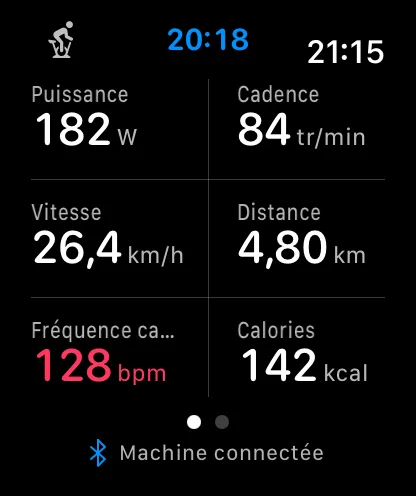
Power · cadence · speed · distance · calories
The bike appears over Bluetooth as JFICycle. It does not send heart rate: Apple Watch measures it.
Start a workout
- Install Kinoment on iPhone. The Apple Watch app installs with it if automatic app install is on.
- Start pedaling to wake the bike’s console.
- Open Kinoment and choose JFICycle in the machine list.
- Start the workout. If you are wearing your unlocked Apple Watch, Kinoment uses it first to add your heart rate.
- Finish the workout: it appears in Fitness with its duration, distance and calories.
Frequently asked questions
The bike does not appear in the list
Pedal for a few seconds to wake the console, then close other fitness apps: the bike only accepts one Bluetooth connection at a time.
Do I need an Apple Watch?
No. An iPhone or iPad is enough to see metrics and save the workout to Fitness. Without a watch, the workout has no heart rate, because the bike does not send it.
Does Kinoment adjust resistance?
No. You set resistance on the bike; Kinoment reads its metrics.
How much does it cost?
Live metrics are free, with no limit. Your first ten workouts added to Health and Fitness are included; a one-time purchase, with no subscription, then adds every workout, with no limit.
Kinoment is an independent app, not affiliated with Basic-Fit. Basic-Fit is a trademark of its owner, mentioned only to describe compatibility.